Jupyter Notebooks: A '0 to 1' Guide
What is a “notebook”?
A Python notebook isn’t a “program” in the traditional sense; it’s a document that holds three things at once:
- Plain Text: Explanations, notes, and titles (like a Word doc).
- Live Code: Real snippets of instructions that the computer can run.
- Visual Results: Graphs, images, or data tables that appear instantly after the code runs.
It’s like a digital recipe book. In a regular cookbook, you read the instructions and then go to the stove to cook. In a Notebook, the “instructions” are right there, and you just click a button to “cook” the dish instantly on the same page.
Here is an example of a Notebook file from Data-Science-For-Beginners:
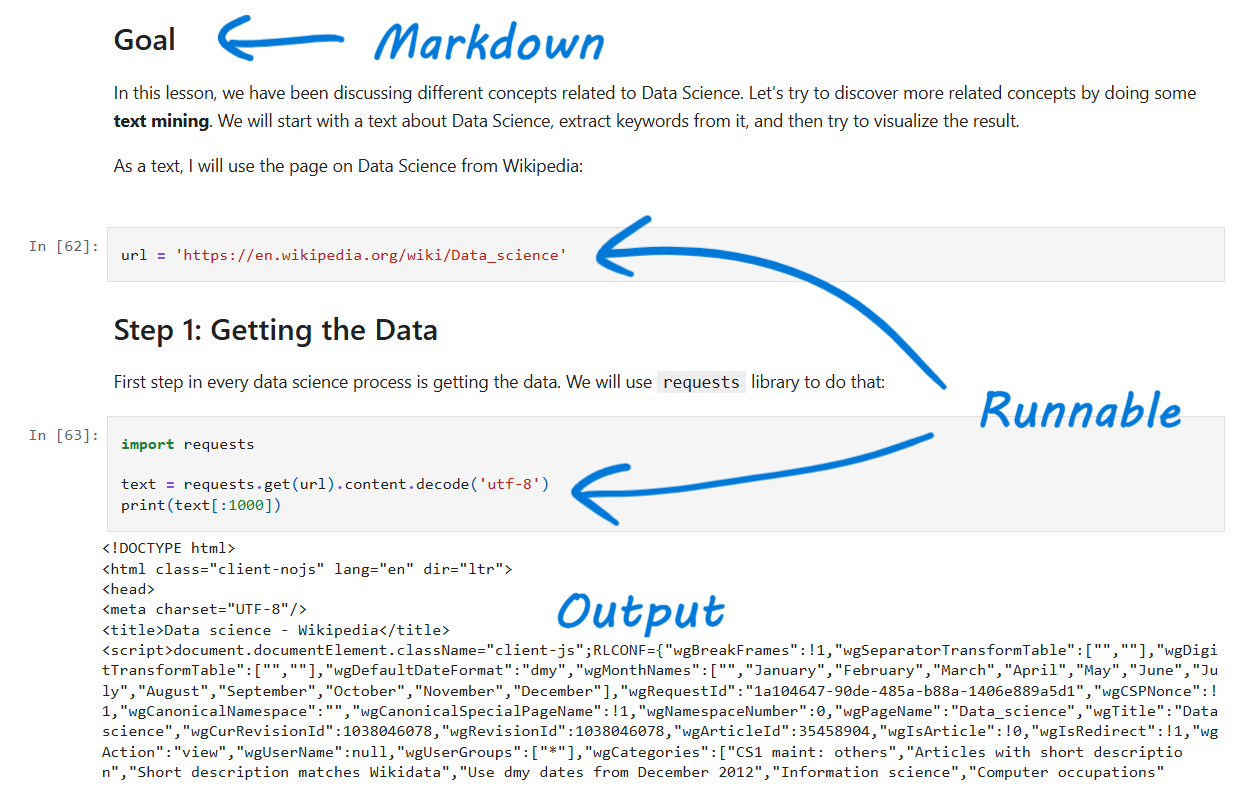
What is a Jupyter Notebook?
You will often hear these three names used interchangeably, but here is how they differ:
- Jupyter Notebook: The “original” version. It’s a program that runs on your own computer’s hard drive and is the gold standard for data scientists.
- JupyterLab: The professional workspace. It’s like an upgraded program where you can have many Notebooks, files, and tools open at the same time.
- Google Colab: The “Google Docs” of AI. It lives in your web browser. You don’t have to install anything, and Google lets you use their powerful “supercomputers” for free to run AI tasks.
A Simple Comparison
| Feature | Jupyter Notebook | Google Colab |
|---|---|---|
| Where it runs | Your own computer | Google’s “Cloud” computers |
| Internet | Not required | Required |
| Best for | Private, local data work | Collaborating and using free AI power |
| Vibe | “The desktop app” | “The Google Doc” |
Why it Matters for AI
Why don’t AI developers just use a “normal” code editor? There are three main reasons:
- Step-by-Step Learning: AI is built in stages (loading data, training the model, testing the results). Notebooks let developers run one stage at a time without restarting.
- Transparency: Notebooks tell a story. They show the thought process (text) alongside the action (code) and the proof (results).
- Collaboration: Because Google Colab is in the cloud, a scientist in London can share an AI model with a student in Tokyo via a simple link. The student can click “Run” and see the AI work instantly.
Notebooks are the ultimate “sandbox.” Instead of writing a massive program and hoping it works, you can test one tiny piece at a time.
-
Want to see if your data loaded correctly? Run one cell.
-
Want to test a specific AI calculation? Run the next cell. If something breaks, you only have to fix that one little section instead of digging through thousands of lines of code.
Learning Resources
If you want to get really good with using Notebooks (and get into AI), try:
Kaggle courses: Aimed at complete beginners wanting to get into Machine Learning. Starts with teaching Python and programming in general, then moves on to Machine Learning and more advanced concepts in a digestible and engaging way.
DeepLearning.AI’s Short Courses: For those wanting to understand the fundamentals of modern Gen AI applications. Heavily covers LLM’s and the latest techniques in LLM applications. Each course has a video with a jupyter notebook alongside it, and you can run the cells while you watch the video!
Get Started
If you just want to play with AI right now, Colab is the way to go.
Level 1: Example Colab Notebook
- Go to: https://colab.research.google.com/
- Sign in with your Google account. You should see a pop up with the title “Open Notebook”.
- Click on “Examples” -> “Overview of Colab Features”
- This will open up a notebook that has explanations of how to interact with notebooks in Colab. Read through it and run the interactive code cells.
Level 2: Create Your Own Notebook
- Go to: https://colab.research.google.com/. Make sure you’re signed in.
- In the “Open Notebook” popup, click the “New Notebook +” button.
- Select your Python environment.
- Try writing some Python cells and Markdown cells and run them.
Graduating to the Big Leagues
Once you’ve experimented in your Notebook and everything works perfectly, it’s time to “build” the actual app.
-
The Transition: You take your successful code from the Notebook and move it into a professional code editor like VS Code.
-
The Result: You turn those experimental “notes” into a clean, standalone Script—a finished program that can run on its own, power a website, or drive an AI app.
The Bottom Line: Use Notebooks to explore, fail fast, and perfect your ideas. Use an IDE like VS Code to package those ideas into a professional tool.